All posts · 10 min read
Free mobile puzzle game options: compare play and pricing
Compare free mobile puzzle game options by offline access, ads, and pricing. Find the right fit for solo play, daily challenges, or competitive matches.
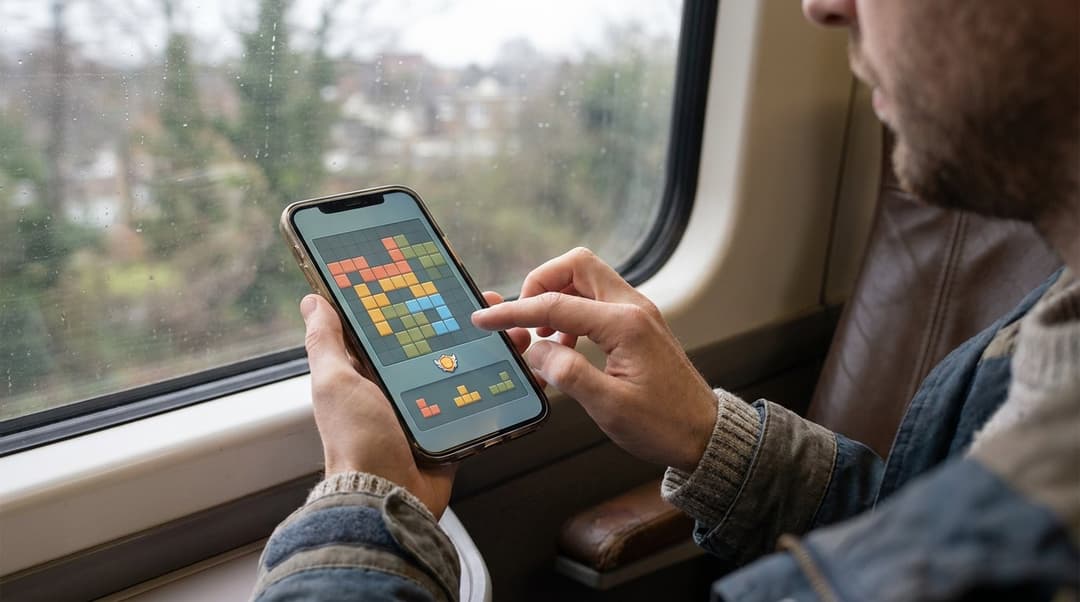
Free is the easy part. A free mobile puzzle game can still differ in offline play, ads, and optional purchases. The right choice depends on how you want to play, not just what it costs to download.
You’re right to look past the word “free.” Some games keep the core play open, while ads, extra content, or subscriptions can shape the experience. This guide compares the details that matter: which popular puzzle games are free, which work offline, where ads appear, and what paid or subscription options may be available.
Use these comparisons to find a game that fits your routine. Want quick solo rounds without a connection? Prefer a daily challenge or a head-to-head match with a friend? We’ll cover gameplay and payment options, including where a competitive block puzzle fits. The goal is to understand the trade-offs and choose with confidence.
Key Takeaways
- Compare popular puzzle styles to find one that fits how you like to play.
- Make offline access a deciding factor if you want puzzles on the go without a connection.
- Look at how ads affect play and whether an ad-free option changes the trade-off.
- Weigh free-to-play, one-time purchase, and subscription models before choosing your next game.
Table of Contents
- 1. What are the most popular Puzzle Games?
- 2. Offline play availability
- 3. Advertisements and optional ad removal
- 4. Free-to-play, premium, and subscription pricing
- Combo Rival: Combo Rivals: Block Puzzle (free mobile game)
1. What are the most popular Puzzle Games?
For iPhone and Android, popular mobile puzzle styles include block placement, match-three boards, word puzzles, and escape-room mysteries. The best free mobile puzzle game depends on the challenge you want: quick pattern matching, careful planning, or clues that unlock a story. Android puzzle-game trend picks are grouped under 2025–2026, but popularity alone won’t tell you whether the mechanics suit you.
Gameplay and difficulty depend on the core rules. Match-three puzzles ask you to spot combinations; block-placement games test your spatial planning; word games draw on vocabulary; and escape-room titles reward careful observation and clue tracking. Daily challenges offer a fresh target, while endless or level-based modes let you choose your pace. Try a round and see whether the rules feel clear and the challenge fair.
For cross-platform play, look for the same title in both the Apple App Store and Google Play. Availability can vary by device and region, so make sure the listing matches your phone or tablet. Daily puzzle modes suit players looking for one focused task; browser-based puzzles offer a quick session without an app install. Escape-room and mystery games are a better fit if you prefer connected clues, objects, and story beats over short board rounds.
For kids, check the age rating in the App Store or Google Play listing, then review the game’s content and privacy details together. Ratings help narrow the options, but the child’s age and comfort with the themes matter too. To install a game, open the relevant store, search for its title, open the listing, and tap the install or get button. Review permissions before opening the game.
For a more privacy-aware choice, read the listing’s data disclosures and allow only permissions that make sense for gameplay. Check the last update date, too: an app that has gone more than two years without an update may not work well on newer phones. These checks can help you avoid a frustrating download and choose a puzzle that suits your device and play style.
2. Offline play availability
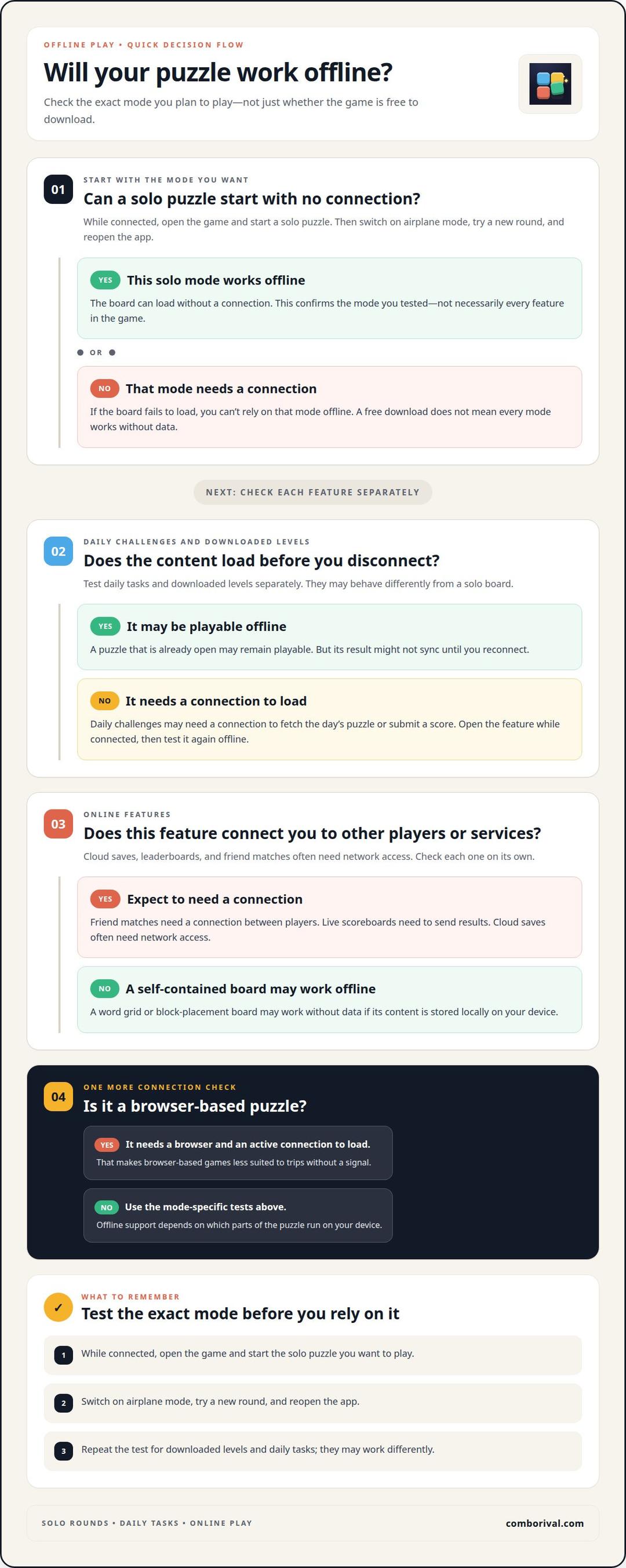
Offline play depends on which parts of a puzzle run on your device. A solo board may load without a connection, while cloud saves, leaderboards, and friend matches often need network access. Check each feature separately: a game may support offline rounds but pause its online features until you reconnect.
Test the exact mode before relying on it during a flight or commute. While connected, open the game and start a solo puzzle, then switch on airplane mode. Try a new round and reopen the app. If the board fails to load, that mode needs a connection. Repeat the test for downloaded levels and daily tasks, as they may work differently.
Daily challenges may depend on a connection to load the day’s puzzle or submit a score. A puzzle that is already open may remain playable offline, but its result might not sync until you reconnect. Browser-based games have a different limitation: they need a browser and an active connection to load, so they’re less suited to trips without a signal.
Online play has clear requirements. Friend matches need a connection between players, and live scoreboards need to send results. A self-contained word grid or block-placement board, on the other hand, may work offline if its content is stored locally. A free download doesn’t mean every mode works without data. Check the store description for offline details, then run the airplane-mode test.
Plan around the mode you’ll actually use. Before leaving home, open the app, load a solo puzzle, and confirm that it starts without a signal. If you want to play daily challenges, open that feature while connected first. For competitive play, expect to need a connection to match with a friend and exchange moves. This simple distinction helps keep solo sessions ready and online features in their lane.
3. Advertisements and optional ad removal
Free-to-play puzzle games may show ads between rounds, on menus, or after a lost level. A banner might sit beside the board, while a full-screen ad interrupts play. Placement matters: an ad after a completed round feels different from one that breaks a timed puzzle or interrupts a move.
Some games offer rewarded ads instead. You might choose to watch one for an in-game bonus, for example. Unlike an automatic video, a rewarded ad lets you decide whether the bonus is worth the interruption. Check whether you can skip the offer and continue without the reward.
Some free-to-play games also offer an optional ad-removal purchase. It may reduce or remove certain ads, but the exact effect depends on the game. Read the in-game description before deciding. Check which ad formats it covers, whether the option is permanent, and whether rewarded videos remain available.
Compare the experience before spending. Play several rounds and note when ads appear and whether they interrupt the puzzle. Then read the ad-removal terms in the game’s settings or store listing. If a rewarded video is optional, watch one only when its stated bonus would help your current run. Don’t mistake an optional reward for a required step.
The best fit depends on how you play. A quick word puzzle may leave room for an ad between rounds; interruptions can be more disruptive in a timed game. If you prefer uninterrupted sessions, weigh the ad frequency against the removal option. If occasional breaks don’t bother you, keep playing for free and skip offers that add no value. Compare the gameplay, not just the download label.
4. Free-to-play, premium, and subscription pricing
“Free” describes the download, but not always the entire experience. A free-to-play puzzle lets you start without buying the game, while optional purchases may add extras, remove ads, or unlock content. A premium game charges upfront. Compare what each model includes before deciding which suits your play habits.
Free-to-play can work well when the core puzzle stays enjoyable without spending. Play several rounds before considering an optional purchase, for example. Note which features are available right away and which require payment. If the game shows ads, compare those interruptions with the value of any ad-removal option.
A premium purchase may suit players who prefer paying once for access rather than weighing repeated offers. The trade-off is straightforward: decide whether the included puzzles justify the upfront cost. Check the store listing to see what the purchase covers, such as access to the game or additional content. Don’t assume every premium title includes all future updates or extras.
A subscription provides access for a set period in exchange for recurring payments. It may suit players who want a rotating selection, but not those who return to one puzzle repeatedly. Before subscribing, check the renewal terms, included games, and cancellation process in the store. Compare the ongoing commitment with buying a single game outright.
Make the call based on your play pattern. A regular player may value a subscription’s range; an occasional player may prefer free access or one premium purchase. Treat ad removal as a separate choice, not a required upgrade. For a direct taste of free-to-play puzzle action, try a block puzzle match.
Combo Rival: Combo Rivals: Block Puzzle (free mobile game)
Combo Rival offers Combo Rivals: Block Puzzle, a free mobile game for players who want more than solo rounds. Choose a quick puzzle session, then switch gears with a live or anytime 1v1 friend duel featuring voice. It brings the head-to-head challenge into the puzzle itself, so each move has a rival on the other side.
For a new solo goal, the Daily puzzle challenge offers a focused way to play. The Season Pass has free and premium tracks, so players can choose how to engage with its progression. Start with the free game and try the modes that fit your mood. Then decide whether you want a daily target or a friend across the board.
Want to learn more about Combo Rivals: Block Puzzle? Contact Combo Rival.
Pick your next move
Your next puzzle should fit how you want to play, not just how it’s sold. Decide what matters most: a quick solo round, a fresh daily target, or a friend to challenge. Then choose a free mobile puzzle game that makes it easy to return to that style of play. Let the gameplay, not the download label, make the call.
If head-to-head block puzzles sound like your lane, Combo Rival gives you a place to put that competitive streak to work. Take the next step at your pace. Contact Combo Rival about your puzzle game to start the conversation.
Choose a mode that fits today. Make the next round yours.
Frequently Asked Questions
What are the most popular Puzzle Games?
Popular mobile puzzle styles include block placement, match-three, word puzzles, and escape-room mysteries. The right pick depends on the move you enjoy repeating. Choose spatial planning, pattern matching, wordplay, or clue hunting. Android trend picks are grouped under 2025–2026, but a familiar mechanic can matter more than a trend label.
Which Puzzle Game Should You Try First?
Start with a style that suits the time and focus you have. Try block placement if you enjoy planning moves, or a daily challenge if you prefer one clear target. For head-to-head play, Combo Rivals: Block Puzzle offers friend duels. Pick a mode, learn the rules, and see if you want another round.
Do free mobile puzzle games require an internet connection?
Some modes work offline, while online features need a connection. A free mobile puzzle game may load a solo board locally, but syncing progress or joining a friend can require network access. Before travelling, open the mode you plan to play. Then enable airplane mode and confirm the round still starts.
Which free puzzle games have no ads or offer an ad-free option?
Ad policies vary by game, so don’t assume a free download means ad-free play. Some titles offer an optional purchase to remove certain ads; others may show ads during play. Read the store listing and in-game purchase details. Check which ad formats the option covers and whether optional rewarded videos remain available.
What in-app purchases do free mobile puzzle games include?
Purchases may include cosmetics, virtual currency, boosters, or premium progression. For example, a free mobile puzzle game may sell visual themes separately from items that affect play. Combo Rivals offers themes, block skins, avatar frames, coin packs, booster packs, and a Season Pass with free and premium tracks. Read each item’s description before deciding.
Which puzzle games can work offline?
Look for titles with self-contained solo puzzles, then test the specific mode before a trip. A board loaded on your device may work without a signal, while score submissions and multiplayer can depend on connectivity. Browser-based puzzles need a connection to load. To test offline play, launch the app, enable airplane mode, and start a new round.